"If you pay your employees or consultants more than $5 per hour,
you will save time and money using FmPro Migrator Platinum Edition to
perform this migration service."
"FmPro Migrator is a professional solution for database administrators
and developers working with FileMaker Pro databases." 3d2f.com
Convert FileMaker Pro to Access with FmPro Migrator
Download the converted Access2013.accdb (1Mb)
files shown in the video above.
The AI Accelerated version of FmPro Migrator Platinum Edition
9.97 - Enhances the Code Conversion Workbench feature for converting FileMaker Pro, Visual FoxPro scripts into Microsoft Access VBA code with the addition of the OpenAI gpt4 model.
FileMaker Pro to Microsoft Access VBA Conversion with the FmPro Code Conversion Workbench
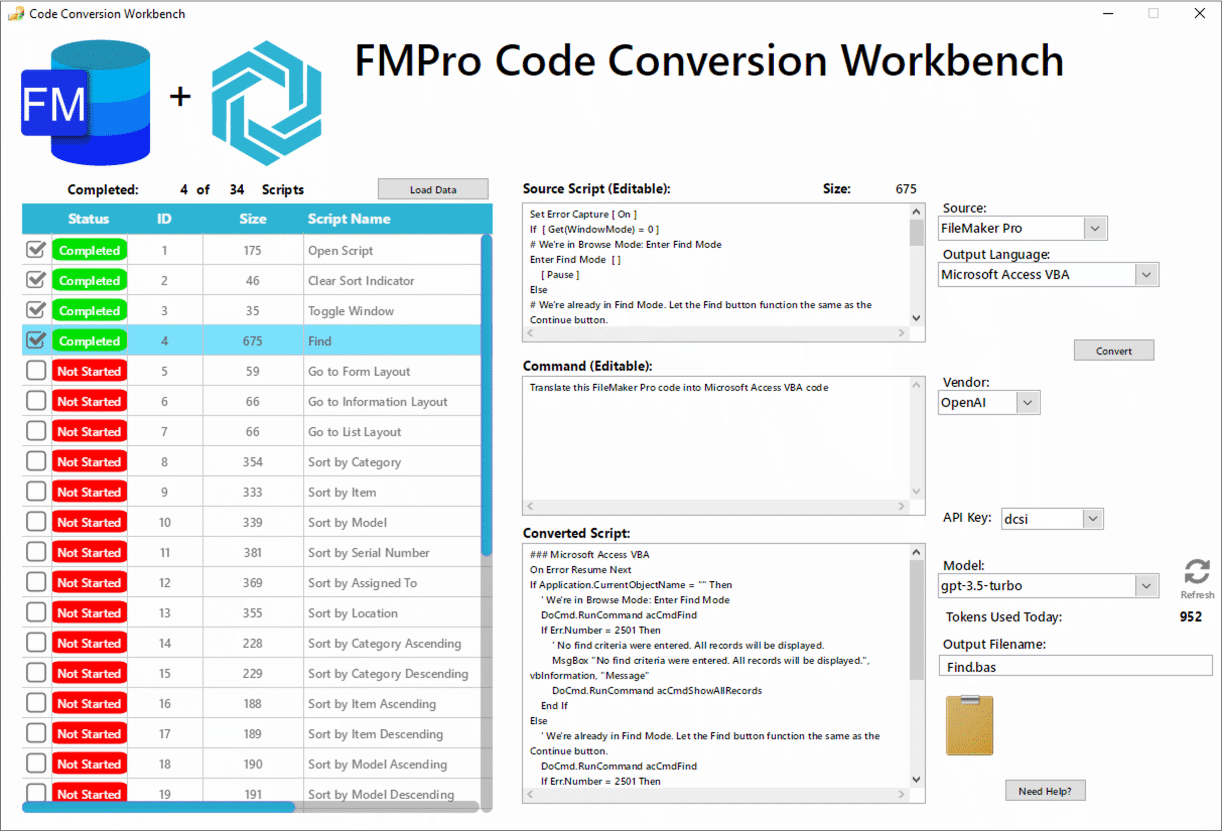
The FmPro Code Conversion Workbench enables developers to manage the automated conversion of hundreds of FileMaker scripts within an entire FileMaker Pro project in a single window. Individual scripts can be selected by name for single-click submission to the selected AI provider and machine learning model. Output files are saved automatically as the results are received into a folder of converted scripts. The FmPro Code Conversion Workbench supports conversions into the top 50 most popular programming languages as found in the TIOBE index, but for an Access database conversion you will probably want VBA code. Machine learning prompts are generated automatically, but the prompt text and source code fields are fully editable. Part of the secret sauce of this tool includes the system prompts and setup parameters which are built into the workbench software.
The machine learning models do a better job of converting scripts from FileMaker Pro to Access VBA compared with previous conversion efforts. The AI models show a deeper understanding of both development environments compared with simple code substiution techniques.
Top 10 Features - FmPro Code Conversion Workbench
Converts FileMaker Pro scripts to Microsoft Access VBA code. Up to 500,000 daily AI Tokens included (per license qty). Efficient workflow manages importing, processing, naming and saving of all scripts. To-Do list checklist shows project status at a glance. Finely tuned system messages and properties are built in and sent automatically. Higher capacity machine learning models are included for converting larger scripts. Flexible GUI provides full control of AI model, source text, prompt text and output filename. Benefit from continuous ongoing improvements to machine learning models. Included with the AI Accelerated version of FmPro Migrator Platinum Edition. FileMaker
Pro scripts are converted into executable
Visual Basic code (including various options and setup parameters).
Top Benefits - FmPro Migrator
Included with FmPro Migrator Platinum Edition - keeps your FileMaker Pro to Microsoft®
Access migration project affordable. Process
your files locally, using FmPro Migrator Platinum Edition. Automated
conversion of FileMaker Pro Layouts to Visual Basic code building the Microsoft Access Forms/Reports. Text-based
radio buttons utilize generated Event code for data compatibility.
FileMaker
Pro relationships are converted into
Access relationships. Custom
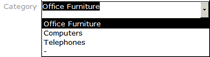
Value Lists from FileMaker Pro are converted to Access combo boxes. Embedded
Layout images are de-duped and added to each generated Access
Form/Report. Saves
many hours of manual work converting each Layout. Builds tables for Microsoft Access, SQL Server or SQL Azure from FileMaker tables. ODBC Data Transfer - Avoids missing column headers or mixed up data columns. Supports
Microsoft Access 2007, 2010, 2013, 2016+ database files.
The FmPro To Access Migration feature built into FmPro
Migrator Platinum Edition provides an automated conversion feature
for FileMaker Pro database files into Microsoft Access .accdb
database files. This feature includes the conversion of layouts, scripts,
relationships, and value lists. This feature
leverages the automated layout and relationship importing features
of FmPro Migrator, along with FileMaker Pro.
The features and benefits of using the FmPro To Access
Migration feature include:
Save
Time, Get Up and Running Quickly - It can be a tedious and time consuming
process to manually re-create each FileMaker Pro layout object into
any other development environment. Rather than spending days or even
weeks of valuable time manually converting hundreds of layouts, Microsoft
Access developers can utilize the FmPro to Access Migration Service
as an economical alternative. FmPro Migrator Developer Edition typically
processes each layout within less than 1 second - much faster than
you could perform the task manually!
The ability to efficiently perform FileMaker Pro to
Access migrations makes it possible to quickly show prototypes to
prospective customers. An automated migration process represents the
ultimate in rapid application development, which can't be matched
by any other development environment. Being able to show customers
a rapid prototype may make the difference in getting approval for
a new client project.
Script
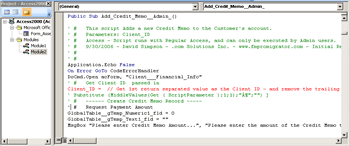
Conversion - Each FileMaker Pro script captured by FmPro Migrator,
is converted into executable Visual Basic code and is saved
to a separate .bas file for editing or importing directly
into the Visual Basic editor. These converted scripts will
require further modification and are intended to be used as
a template for the development of new Visual Basic code which
will be used to replace the original FileMaker Pro script
functionality by the Microsoft Access developer.
Relationship
Conversion
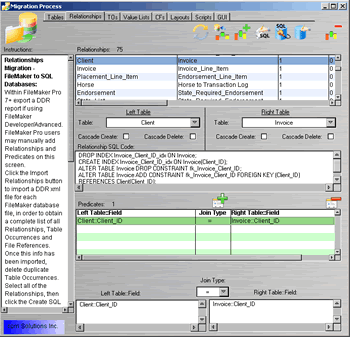
FileMaker Pro relationships imported by FmPro Migrator
are converted into Access SQL relationship code. This relationship
SQL code is then run within the Access database to build each
relationship.
Radio
Button Value Lists and Form Events
FileMaker Pro radio buttons utilize text based value lists
which are not directly compatible with Access radio button
sets. The migrated data from the original FileMaker Pro database
will also be in text form instead of the numeric values typically
used for radio buttons within Microsoft Access.
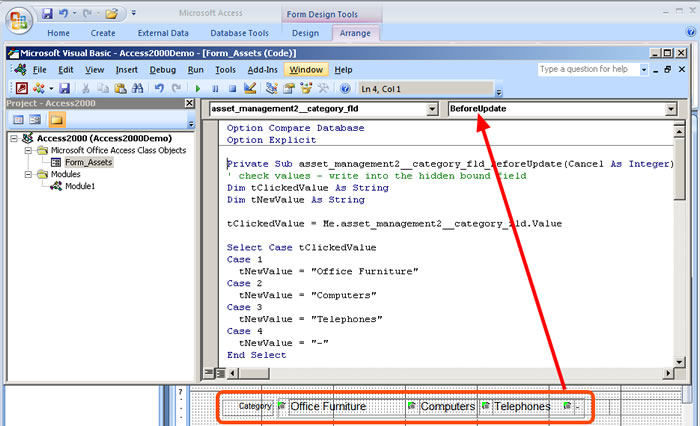
FmPro Migrator generates a hidden field bound to the underlying
database field along with Form BeforeEvent and Form Current
Event code to translate the text based values back and forth
between the radio buttons and the underlying database table.
The Form Event code is automatically generated by FmPro Migrator
and ready for pasting into each Form or Report.
Custom
Value Lists
Custom Value Lists are read from the FileMaker Pro DDR XML
file and used to create ComboBox objects on every Access Form/Report
where the original Value List was used.
Embedded
Layout Images
Embedded layout graphic images are saved into an images
folder and are also placed onto each Access Form or Report
in the same size and location as the original layout. Only
unique copies of images are exported from the layouts, in
order to prevent wasting space due to duplicate images.
This means that if an image such as a company logo is used
on 100 different layouts, only one single copy of that graphic
will be saved, as all of the other 99 copies are duplicates
of the original image.
FileMaker Pro stores GIF, PNG and JPEG images in their
native formats within the layout. All other image types
are also converted and stored in the JPEG file format in
order to guarantee compatibility with Instant Web Publishing.
Therefore the conversion process follows this same compatibility
implementation by extracting GIF, PNG and JPEG images for
use on the Access Forms and Reports.
Having the images available as external files prior to
building the Forms/Reports makes it possible to substitute
new images for the original images. As long as the filenames
remain the same, the generated Visual Basic code will utilize
the replaced image within all of the locations where the
original file was used.
Notes: Only embedded images can be extracted from
the FileMaker Pro layout. Images stored as a reference to
a file on the file system will show up as an empty image
object on the Access Form or Report. Also, if the JPEG version
of a non-native image format is corrupted within the layout,
unexpected results can occur. If the image doesn't display
properly within FileMaker Pro Instant Web Publishing, then
it won't be displayed on the Access Form or Report either.
Microsoft Access 2007 does a better job of matching the
image resizing of embedded graphics images to match the
original image display within he FileMaker Pro database.
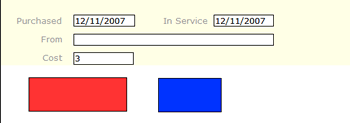
Rectangle
Objects
Regular rectangle and rounded rectangle objects are commonly
used as backgrounds within FileMaker Pro layouts. Both of
these objects are converted to regular rectangle vector
graphic objects on Microsoft Access Forms/Reports.
Circle/Oval
Objects
Microsoft Access does not include support for Circle/Oval
vector graphic objects. FmPro Migrator converts these
objects into PNG images which are imported as embedded
Form/Report image objects.
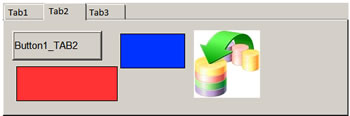
TAB
Panel Objects
FileMaker Pro Tab Panels are directly compatible with
Microsoft Access Tab Controls. Tab Panel names are checked
for duplication, and the embedded objects are added to
each Tab Control from the original layout.
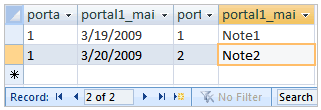
Portals
Converted to Subforms
An Access Subform is automatically created and positioned
on the main form in order to represent each FileMaker
Pro portal. The Subform is configured to display records
from the related table referenced in the original Portal
definition. When the SubForm object is created, the the definition of the LinkMasterFields and LinkChildFields properties define the proper keys to display related records.
Container
Field to OLE Object
FileMaker Pro container fields are typically used to
store images for display on FileMaker Pro layouts. Container
field image data is converted into SQL Server database BLOB columns, which can be linked to Access OLE Object
fields for display within Access Forms/Reports. In order
for the Access database to display images written into
OLE Object fields via ODBC, it is necessary to use the
DBPix ActiveX control.
A placeholder for the Ammara DBPix control is put onto
the generated Form/Report, for further customization
and configuration by the Access developer.
Text
Label Conversion
FileMaker Pro text labels are converted into Access
acLabel objects, having the same color, font name, and
justification as the original text label. Text font
sizes are reduced by 1pt size in order to more accurately
match the display of objects on the Access Form/Report.
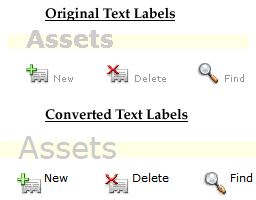
The example on the left shows that the grey 24pt "Assets"
text label using the Bold Verdana font has been converted
into grey 23pt Verdana text having a Normal font weight.
The bounding box was manually extended to the right
and moved downward to match the original location.
The converted versions of the "New/Delete/Find"
text labels are shown displayed a little higher than
their original locations next to the embedded images.
Note: Due to differences between databases and
platforms, it will often be necessary to modify the
size and position of the text label bounding boxes on
the converted Form/Report.
Layout Objects Supported
Container Field
Field
Field with Value List Menu
Field with Single Checkbox
Field displayed as Radio Button Set
Custom Value Lists
Text
Button (including non-button objects configured as buttons)
Portal (including portal objects)
Line
Rectangle
RoundedRectangle
Oval/Circle
Embedded Layout Image Graphics
Tab Panel with embedded objects
FmPro To Access Migration Feature Pricing
Note: FmPro Migrator Platinum Edition includes
an FmPro to Access Qty 250 License Key - Unlimited Number of Database Files.
FmPro to Access Conversion Fixed-Price Consulting
Demo Mode
Due to the complexity associated with any database
migration project, it is recommended that a small test project be
completed prior to starting the full conversion project. By default,
FmPro Migrator Developer Edition processes FmPro to Access migration
projects in demo mode without a license key. In Demo mode, FmPro
Migrator Developer Edition will process 5 layouts and 5 scripts.
Using the demo mode at no charge, enables Access
developers to become familiar with the conversion process and see
the completed layouts in the Microsoft Access database.
Processing Steps & Requirements
Requirements: FmPro Migrator Platinum Edition - FmPro Migrator Platinum
Edition is used for capturing the structure info from the FileMaker
Pro database file and generating the Visual Basic code required
to build each Form, Report and SubForm. FmPro Migrator Developer
Edition utilizes the DDR XML file generated by FileMaker Pro Advanced
11+, in order to automate the importing of Layouts, Relationships,
Value Lists and Scripts. Tables/Fields and Script Workspace scripts are
copied into FmPro Migrator via the ClipBoard from
FileMaker Pro. This import process follows the steps detailed
in the FileMaker
Pro to Access Migration Process PDF file. Once the info has
been captured by FmPro Migrator Developer Edition, click the FmPro
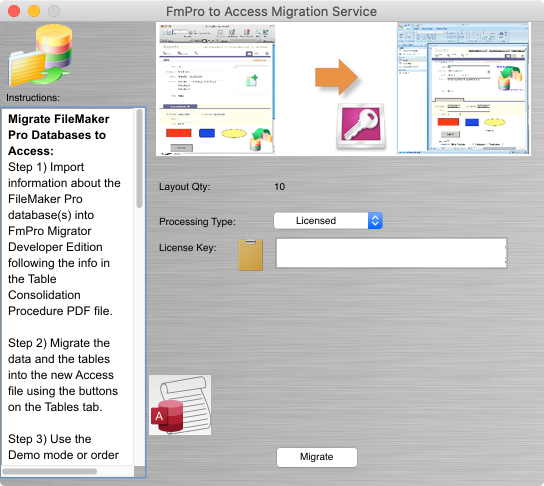
to Access Migration Service button on the GUI tab. Open the _LoadAllFormsAndReports.bas
file within the Visual Basic editor to build each of the Forms/Reports
within the Access database file. In demo mode, FmPro Migrator Developer
Edition will convert 5 layouts and 5 scripts into Microsoft Access
2007, 2010, 2013, 2016+ .accdb files. Buying a license key for the FmPro to Access Migration
Service provides full-featured migration of the quantity of layouts
ordered. This license key enables the processing of the specified
quantity of layouts for an unlimited number of FileMaker Pro database
files for the duration of the license key. FmPro Migrator Platinum
Edition may also be used by the Access developer to perform
the conversion of the FileMaker Pro database tables, data and relationships
into Microsoft Access.
You can download the migrated AccessDemo2013.accdb (1Mb)
which is displayed at the top of this page.
FileMaker Pro Advanced 11+ - FileMaker Pro Advanced is used
for creating a DDR XML export file providing the structure of the
FileMaker Pro database file. This file is used for importing the
relationships, Value Lists and Layouts from the original FileMaker
Pro database.
Microsoft Access 2007, 2010 2013, 2016+ - The version
of Microsoft Access required must be at least Access 2007, in order
to support the execution of the Form/Report Visual Basic code generated
by FmPro Migrator Platinum Edition.
The FmPro To Access Migration
Service utilizes FmPro Migrator Platinum Edition along with the
other software listed here in order to automate the capturing of
layouts, relationships, value lists and scripts from the FileMaker
Pro database file. Once the information has been captured, it is
stored within FmPro Migrator's MigrationProcess.db3 embedded database
file and saved to the output directory. This file serves as the
source of info for the FmPro to Access Migration process.





 Converts FileMaker Pro scripts to Microsoft Access VBA code.